Tutorial: build a to-do app
A step-by-step guide for first-time users. You build a to-do app from three files, add saving and components, and put it on the internet. All you install is an editor and Python; there are no build tools. Each step takes about ten minutes.
Every step has an Open the finished step link. If you get stuck, compare it with your files. The code on this page is the same code the tests run.
Get ready
- Editor: install Visual Studio Code. Notepad works too, but colors help.
- Python: it runs a small server that shows your files in the browser. Type
python --versionin a terminal (PowerShell on Windows); if a version appears, you are ready.- If not, install it from python.org. On Windows, tick Add python.exe to PATH on the first screen of the installer.
- Folder: make a folder named
todo(on the desktop, for example) and open it in VS Code with File → Open Folder.
Run the server inside the todo folder. In VS Code open Terminal → New Terminal, type the line below, then open http://localhost:8080/ in the browser. Press Ctrl+C in the terminal to stop it.
python -m http.server 8080- If you open the file by double-clicking it (
file://), the browser blocks some features. Always use the address above. - Press F12 in the browser to open the developer tools. Red text in the Console tab means something in the code is wrong. The development build of vfunc explains common mistakes with yellow warnings.
Step 1: the first screen
Make three files in the todo folder. First index.html, the frame of the page, which loads vfunc and your code.
<!DOCTYPE html>
<html lang="en">
<head>
  <meta charset="utf-8">
  <meta name="viewport" content="width=device-width, initial-scale=1">
  <meta http-equiv="Content-Security-Policy"
        content="default-src 'self'; script-src 'self' https://cdn.jsdelivr.net; style-src 'self' https://cdn.jsdelivr.net; img-src 'self' data:; object-src 'none'; base-uri 'none'">
  <title>To-do — step 1</title>
  <link rel="stylesheet" href="https://cdn.jsdelivr.net/npm/vfunc@1.2.0/css/vfunc.tokens.css"
        integrity="sha384-QwsFKKFVXW8Lo7pML80GpQro2b0FlTfTrSjGN+YMCyx868Oa2bXlbYRGuUUbgiVw" crossorigin="anonymous">
  <link rel="stylesheet" href="./style.css">
</head>
<body>
  <main class="todo">
    <h1 class="todo__title">Today's to-dos</h1>
    <div id="app"></div>
  </main>
  <script src="https://cdn.jsdelivr.net/npm/vfunc@1.2.0/dist/vfunc.js"
        integrity="sha384-HOwph430qtUZpsvBjI0IzL1lkEipwi7yZYM7X7z21/bLJsChFHRF9E5OvWde7RjH" crossorigin="anonymous"></script>
  <script src="./app.js"></script>
</body>
</html>
- The
Content-Security-Policyline is a security setting: only files from this site and the CDN (jsdelivr) may run. Leave it as it is. vfunc.tokens.cssholds the design tokens: colors, spacing and fonts, with a light and a dark theme.vfunc.jsis the development build.integritylets the browser check that the file it received was not changed.<div id="app">is where the app is drawn.
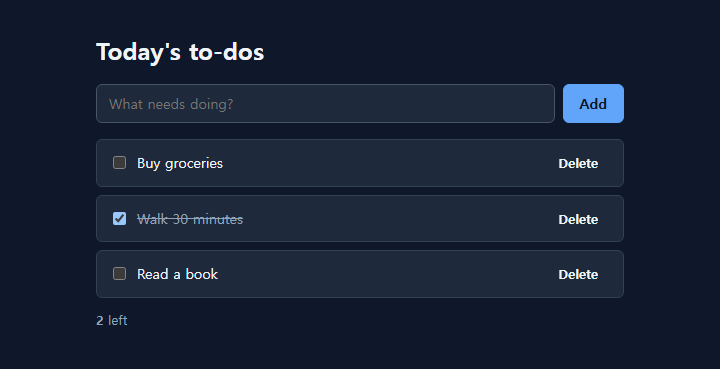
You keep one style.css until the end, so copy it once and move on. Colors and spacing are all var(--vf-…) tokens, so they change with the theme.
/* The to-do app's styles. Colors, spacing and fonts use tokens (var(--vf-*)) only. */
*, *::before, *::after { box-sizing: border-box; }

body {
  margin: 0;
  background: var(--vf-color-bg);
  color: var(--vf-color-text);
  font-family: var(--vf-font-body);
  font-size: var(--vf-font-size-md);
  line-height: var(--vf-line-height);
}

.todo { max-width: 560px; margin: 0 auto; padding: var(--vf-space-6) var(--vf-space-4); }
.todo__title { margin: 0 0 var(--vf-space-4); font-size: var(--vf-font-size-2xl); }
.todo__label { display: block; margin-bottom: var(--vf-space-1); font-weight: var(--vf-font-weight-strong); }
.todo__greeting { font-size: var(--vf-font-size-lg); }

.todo__form { display: flex; gap: var(--vf-space-2); margin-bottom: var(--vf-space-4); }
.todo__input {
  flex: 1;
  width: 100%;
  padding: var(--vf-space-2) var(--vf-space-3);
  border: 1px solid var(--vf-color-border-strong);
  border-radius: var(--vf-radius-md);
  background: var(--vf-color-surface);
  color: var(--vf-color-text);
  font: inherit;
}
.todo__button {
  padding: var(--vf-space-2) var(--vf-space-4);
  border: 0;
  border-radius: var(--vf-radius-md);
  background: var(--vf-color-primary);
  color: var(--vf-color-on-primary);
  font: inherit;
  cursor: pointer;
}
.todo__button:hover { background: var(--vf-color-primary-hover); }
.todo__input:focus-visible, .todo__button:focus-visible, .todo__remove:focus-visible {
  outline: none;
  box-shadow: var(--vf-focus-ring);
}

.todo__list { list-style: none; margin: 0; padding: 0; }
.todo__item {
  display: flex;
  align-items: center;
  gap: var(--vf-space-2);
  padding: var(--vf-space-2) var(--vf-space-3);
  margin-bottom: var(--vf-space-2);
  border: 1px solid var(--vf-color-border);
  border-radius: var(--vf-radius-md);
  background: var(--vf-color-surface);
}
.todo__text { flex: 1; }
.todo__item[data-state="done"] .todo__text { color: var(--vf-color-text-muted); text-decoration: line-through; }
.todo__remove {
  border: 0;
  background: transparent;
  color: var(--vf-color-text-muted);
  font: inherit;
  cursor: pointer;
}
.todo__remove:hover { color: var(--vf-color-danger-text); }
.todo__footer { margin: var(--vf-space-3) 0 0; color: var(--vf-color-text-muted); font-size: var(--vf-font-size-sm); }
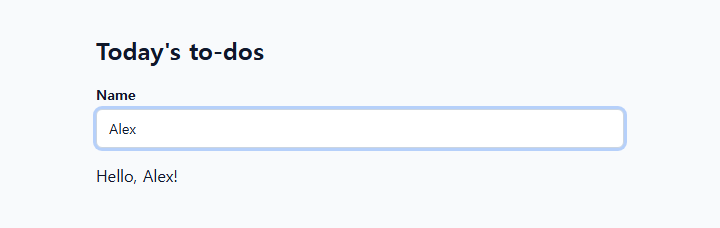
app.js is the vfunc code.
// Step 1: one component. When the state changes, the screen is drawn again.
const hello = vf.vfunc({
  state: { name: '' },
  render: (s) => vf.html`
    <label class="todo__label" for="name">Name</label>
    <input class="todo__input" id="name" data-action="rename" value="${s.name}"
           placeholder="Type your name" autocomplete="off">
    <p class="todo__greeting" data-ref="greeting">Hello, ${s.name || 'guest'}!</p>`,
  delegates: [{
    selector: '[data-action="rename"]',
    eventType: 'input',
    onEvent: (e) => { e.sender.name = e.target.value; }
  }]
});

hello.mount('#app');
vf.vfunc({ … })makes a component, one part of the screen.stateholds what the component remembers.rendertakes the state and returns HTML; it runs again when the state changes.- HTML made with
vf.htmlis safe. Type<b>bold</b>as the name: it is shown as text, not in bold. delegatesconnect events. Wheninputhappens on the element withdata-action="rename", the code changese.sender.name, and the screen is drawn again.hello.mount('#app')puts the component in the#appspot.
Step 2: add to-dos
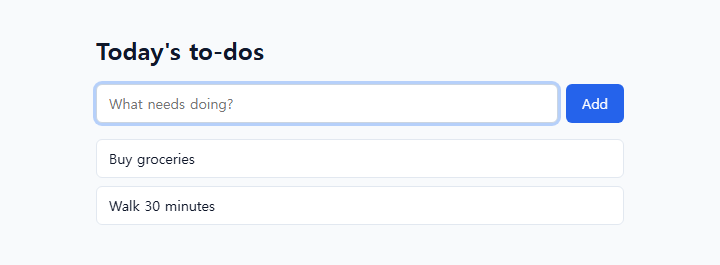
Now take to-dos instead of a name. Replace app.js with the code below; index.html and style.css stay the same.
// Step 2: add to-dos. Put what was typed into the list (state.items) and the list is drawn again.
let nextId = 1;

const todo = vf.vfunc({
  state: { items: [] },
  render: (s) => vf.html`
    <form class="todo__form" data-action="add">
      <input class="todo__input" name="text" data-ref="input" aria-label="To-do"
             placeholder="What needs doing?" autocomplete="off" required>
      <button class="todo__button" type="submit">Add</button>
    </form>
    <ul class="todo__list">
      ${s.items.map((item) => vf.html`<li class="todo__item">${item.text}</li>`)}
    </ul>`,
  delegates: [{
    selector: '[data-action="add"]',
    eventType: 'submit',
    onEvent: (e) => {
      e.event.preventDefault();                   // keep the form from reloading the page
      const text = e.sender.refs.input.value.trim();
      if (!text) return;
      e.sender.items = e.sender.items.concat({ id: nextId++, text: text });
    }
  }]
});

todo.mount('#app');
- The list is the
state.itemsarray.rendermakes an<li>for each item withitems.map(…). - A form tries to reload the page when it is sent.
e.event.preventDefault()stops that. - The element with
data-ref="input"is found ase.sender.refs.input. - To change the list, make a new array with
concatand assign it. The assignment makes vfunc draw again.
Step 3: mark as done and delete
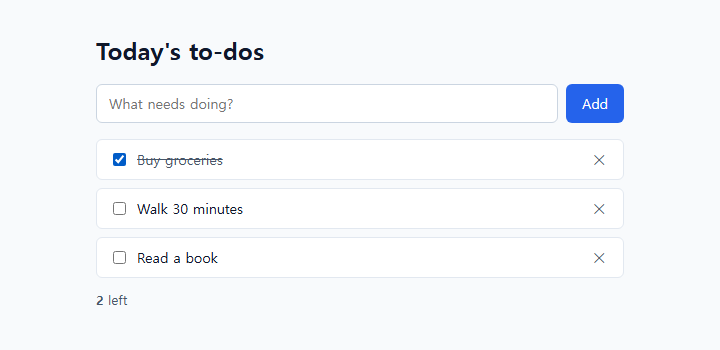
Give each item a checkbox and a delete button, and show how many are left.
// Step 3: mark as done and delete. Buttons in the list are told apart by data-action; the item is found by data-id.
let nextId = 1;

const row = (item) => vf.html`
  <li class="todo__item" data-id="${item.id}" data-state="${item.done ? 'done' : 'open'}">
    <input type="checkbox" id="done-${item.id}" data-action="toggle" ${item.done ? 'checked' : ''}>
    <label class="todo__text" for="done-${item.id}">${item.text}</label>
    <button class="todo__remove" type="button" data-action="remove" aria-label="Delete">✕</button>
  </li>`;

// The data-id of the row the event happened in, as a number.
const idOf = (e) => Number(e.target.closest('[data-id]').getAttribute('data-id'));

const todo = vf.vfunc({
  state: { items: [] },
  render: (s) => {
    const left = s.items.filter((item) => !item.done).length;
    return vf.html`
      <form class="todo__form" data-action="add">
        <input class="todo__input" name="text" data-ref="input" aria-label="To-do"
               placeholder="What needs doing?" autocomplete="off" required>
        <button class="todo__button" type="submit">Add</button>
      </form>
      <ul class="todo__list">${s.items.map(row)}</ul>
      <p class="todo__footer"><strong data-ref="left">${left}</strong> left</p>`;
  },
  methods: {
    add(text) {
      this.items = this.items.concat({ id: nextId++, text: text, done: false });
    },
    toggle(id) {
      this.items = this.items.map((item) => (item.id === id ? { id: item.id, text: item.text, done: !item.done } : item));
    },
    remove(id) {
      this.items = this.items.filter((item) => item.id !== id);
    }
  },
  delegates: [
    {
      selector: '[data-action="add"]',
      eventType: 'submit',
      onEvent: (e) => {
        e.event.preventDefault();
        const text = e.sender.refs.input.value.trim();
        if (text) e.sender.add(text);
      }
    },
    { selector: '[data-action="toggle"]', eventType: 'change', onEvent: (e) => e.sender.toggle(idOf(e)) },
    { selector: '[data-action="remove"]', eventType: 'click', onEvent: (e) => e.sender.remove(idOf(e)) }
  ]
});

todo.mount('#app');
rowdraws one item. Each row gets adata-idso the code knows which item it is.- You do not add an event to every button. The component has one delegate for
data-action="toggle"and one fordata-action="remove", andidOf(e)reads the row'sdata-id. With 1000 items there are still three listeners. - The actions live in
methods. Inside,thisis the component andthis.itemsisstate.items. - A finished row has
data-state="done"; the line through it comes from[data-state="done"]in style.css. The JavaScript never decides how things look.
Step 4: save the list
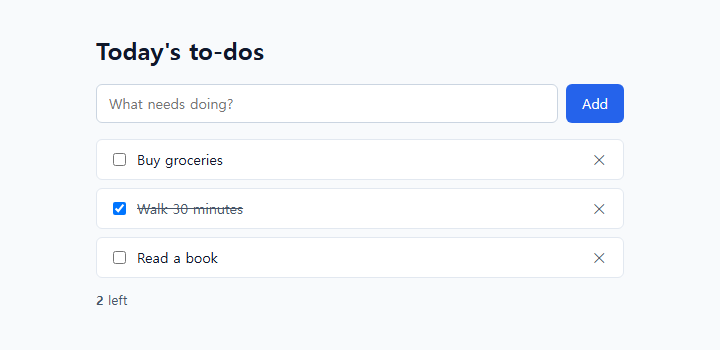
Right now the list disappears when you reload. Save it in the browser's storage (localStorage).
// Step 4: save. Every time the list changes it is saved in the browser (localStorage) and loaded when the page opens.
const KEY = 'vfunc-tutorial-todo';

// Saved values come from outside the code, so keep only the fields we need.
function load() {
  try {
    const saved = JSON.parse(localStorage.getItem(KEY)) || [];
    return saved.map((item) => ({ id: Number(item.id), text: String(item.text), done: item.done === true }));
  } catch (err) {
    return [];
  }
}

const saved = load();
let nextId = saved.reduce((max, item) => Math.max(max, item.id), 0) + 1;

const row = (item) => vf.html`
  <li class="todo__item" data-id="${item.id}" data-state="${item.done ? 'done' : 'open'}">
    <input type="checkbox" id="done-${item.id}" data-action="toggle" ${item.done ? 'checked' : ''}>
    <label class="todo__text" for="done-${item.id}">${item.text}</label>
    <button class="todo__remove" type="button" data-action="remove" aria-label="Delete">✕</button>
  </li>`;

const idOf = (e) => Number(e.target.closest('[data-id]').getAttribute('data-id'));

const todo = vf.vfunc({
  state: { items: saved },
  render: (s) => {
    const left = s.items.filter((item) => !item.done).length;
    return vf.html`
      <form class="todo__form" data-action="add">
        <input class="todo__input" name="text" data-ref="input" aria-label="To-do"
               placeholder="What needs doing?" autocomplete="off" required>
        <button class="todo__button" type="submit">Add</button>
      </form>
      <ul class="todo__list">${s.items.map(row)}</ul>
      <p class="todo__footer"><strong data-ref="left">${left}</strong> left</p>`;
  },
  // Called after every render. Save here.
  onUpdate: (inst) => {
    localStorage.setItem(KEY, JSON.stringify(inst.items));
  },
  methods: {
    add(text) {
      this.items = this.items.concat({ id: nextId++, text: text, done: false });
    },
    toggle(id) {
      this.items = this.items.map((item) => (item.id === id ? { id: item.id, text: item.text, done: !item.done } : item));
    },
    remove(id) {
      this.items = this.items.filter((item) => item.id !== id);
    }
  },
  delegates: [
    {
      selector: '[data-action="add"]',
      eventType: 'submit',
      onEvent: (e) => {
        e.event.preventDefault();
        const text = e.sender.refs.input.value.trim();
        if (text) e.sender.add(text);
      }
    },
    { selector: '[data-action="toggle"]', eventType: 'change', onEvent: (e) => e.sender.toggle(idOf(e)) },
    { selector: '[data-action="remove"]', eventType: 'click', onEvent: (e) => e.sender.remove(idOf(e)) }
  ]
});

todo.mount('#app');
onUpdateruns after every render. The list is drawn again whenever it changes, so this is the place to save.load()reads the saved text back into a list. Stored values can be changed from outside, so it keeps only the fields it needs (id,text,done).- New item numbers (
nextId) continue after the saved ones. - The storage belongs to this browser and this address only. Another computer or a private window does not see it.
Step 5: use components
vfunc comes with components (vfunc-ui) such as buttons, an empty screen, notifications and confirm dialogs. Use them only where they help. Add two lines to index.html (vfunc-ui.css and vfunc-ui.js).
<!DOCTYPE html>
<html lang="en">
<head>
  <meta charset="utf-8">
  <meta name="viewport" content="width=device-width, initial-scale=1">
  <meta http-equiv="Content-Security-Policy"
        content="default-src 'self'; script-src 'self' https://cdn.jsdelivr.net; style-src 'self' https://cdn.jsdelivr.net; img-src 'self' data:; object-src 'none'; base-uri 'none'">
  <title>To-do — step 5</title>
  <link rel="stylesheet" href="https://cdn.jsdelivr.net/npm/vfunc@1.2.0/css/vfunc.tokens.css"
        integrity="sha384-QwsFKKFVXW8Lo7pML80GpQro2b0FlTfTrSjGN+YMCyx868Oa2bXlbYRGuUUbgiVw" crossorigin="anonymous">
  <link rel="stylesheet" href="https://cdn.jsdelivr.net/npm/vfunc@1.2.0/css/vfunc-ui.css"
        integrity="sha384-lb4q+RHHylsEIsyBQuDJbSZAAocK3fj1H4bBQFf5S7UoMLfN2j3L/G9L5AYE6uIA" crossorigin="anonymous">
  <link rel="stylesheet" href="./style.css">
</head>
<body>
  <main class="todo">
    <h1 class="todo__title">Today's to-dos</h1>
    <div id="app"></div>
  </main>
  <script src="https://cdn.jsdelivr.net/npm/vfunc@1.2.0/dist/vfunc.js"
        integrity="sha384-HOwph430qtUZpsvBjI0IzL1lkEipwi7yZYM7X7z21/bLJsChFHRF9E5OvWde7RjH" crossorigin="anonymous"></script>
  <script src="https://cdn.jsdelivr.net/npm/vfunc@1.2.0/dist/vfunc-ui.js"
        integrity="sha384-I+GaVCl8OOTjHk4zMfuH/l8vwopR07O0vlZUgVvqmwSJwKjtG6+u8Yc3KkZBUm3G" crossorigin="anonymous"></script>
  <script src="./app.js"></script>
</body>
</html>
app.js:
// Step 5: use components (vfunc-ui). Buttons and the empty screen are vs* (markup); the toast and the confirm dialog are vf* (instances).
const KEY = 'vfunc-tutorial-todo';

function load() {
  try {
    const saved = JSON.parse(localStorage.getItem(KEY)) || [];
    return saved.map((item) => ({ id: Number(item.id), text: String(item.text), done: item.done === true }));
  } catch (err) {
    return [];
  }
}

const saved = load();
let nextId = saved.reduce((max, item) => Math.max(max, item.id), 0) + 1;
let toast;   // the notification area: one per page (made at the very end)

const row = (item) => vf.html`
  <li class="todo__item" data-id="${item.id}" data-state="${item.done ? 'done' : 'open'}">
    <input type="checkbox" id="done-${item.id}" data-action="toggle" ${item.done ? 'checked' : ''}>
    <label class="todo__text" for="done-${item.id}">${item.text}</label>
    ${vf.vsButton({ label: 'Delete', variant: 'ghost', size: 'sm', action: 'remove' })}
  </li>`;

const idOf = (e) => Number(e.target.closest('[data-id]').getAttribute('data-id'));

const todo = vf.vfunc({
  state: { items: saved },
  render: (s) => {
    const left = s.items.filter((item) => !item.done).length;
    return vf.html`
      <form class="todo__form" data-action="add">
        <input class="todo__input" name="text" data-ref="input" aria-label="To-do"
               placeholder="What needs doing?" autocomplete="off" required>
        ${vf.vsButton({ label: 'Add', type: 'submit', variant: 'primary' })}
      </form>
      ${s.items.length
        ? vf.html`<ul class="todo__list">${s.items.map(row)}</ul>
                  <p class="todo__footer"><strong data-ref="left">${left}</strong> left</p>`
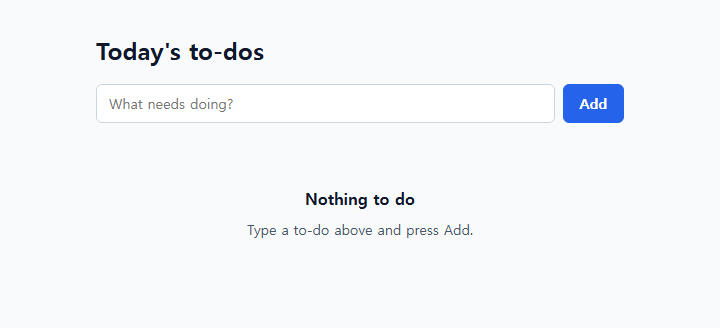
        : vf.vsEmptyState({ title: 'Nothing to do', description: 'Type a to-do above and press Add.' })}`;
  },
  onUpdate: (inst) => {
    localStorage.setItem(KEY, JSON.stringify(inst.items));
  },
  methods: {
    add(text) {
      this.items = this.items.concat({ id: nextId++, text: text, done: false });
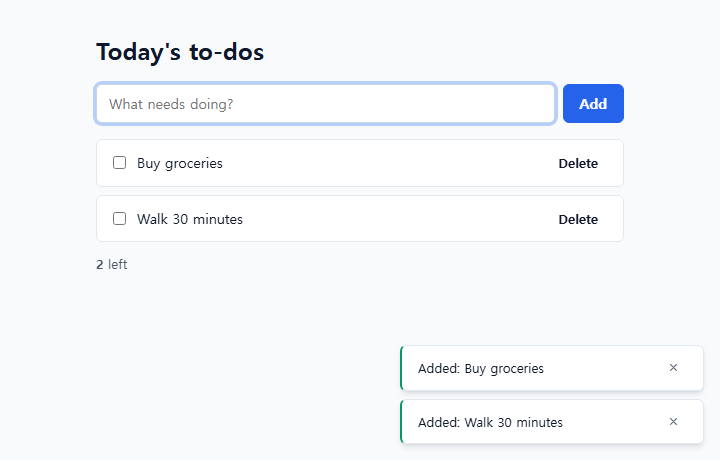
      toast.show({ message: 'Added: ' + text, variant: 'success' });
    },
    toggle(id) {
      this.items = this.items.map((item) => (item.id === id ? { id: item.id, text: item.text, done: !item.done } : item));
    },
    // Ask once before deleting. open() waits for the answer (true or false).
    async remove(id) {
      const item = this.items.find((x) => x.id === id);
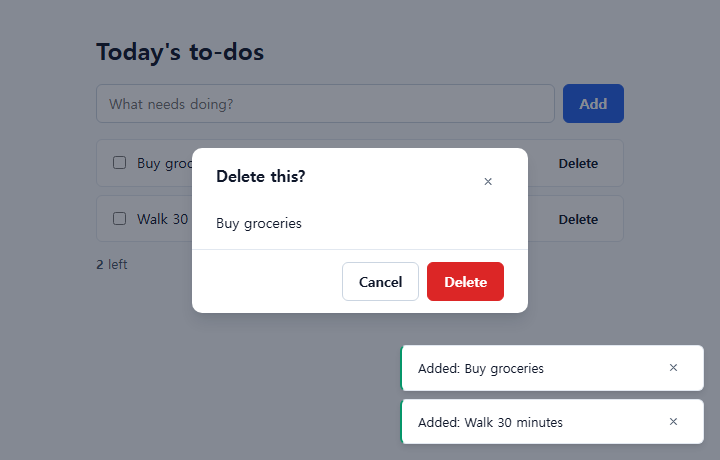
      const dialog = vf.vfConfirm({ title: 'Delete this?', message: item.text, variant: 'danger', confirmLabel: 'Delete' });
      const ok = await dialog.open();
      dialog.destroy();
      if (!ok) return;
      this.items = this.items.filter((x) => x.id !== id);
      toast.show({ message: 'Deleted' });
    }
  },
  delegates: [
    {
      selector: '[data-action="add"]',
      eventType: 'submit',
      onEvent: (e) => {
        e.event.preventDefault();
        const text = e.sender.refs.input.value.trim();
        if (text) e.sender.add(text);
      }
    },
    { selector: '[data-action="toggle"]', eventType: 'change', onEvent: (e) => e.sender.toggle(idOf(e)) },
    { selector: '[data-action="remove"]', eventType: 'click', onEvent: (e) => e.sender.remove(idOf(e)) }
  ]
});

toast = vf.vfToast();
todo.mount('#app');
vf.vs…returns a piece of HTML. Put it straight intorender, like${vf.vsButton({ … })}.action: 'remove'becomesdata-action="remove", so the delegate from step 3 still works.vf.vf…returns a live component. The notification areavf.vfToast()is made once per page and used withtoast.show({ … }).open()ofvf.vfConfirmwaits until the user chooses, soremoveisasyncand gets the answer withawait. After the answer,destroy()cleans it up.
Step 6: put it on the internet
Switch to the production files. The development vfunc.js carries its warning texts and is larger. Before publishing, change the scripts in index.html to the min files. Here is step 5's index.html for production (the integrity values changed with the files).
<!DOCTYPE html>
<html lang="en">
<head>
  <meta charset="utf-8">
  <meta name="viewport" content="width=device-width, initial-scale=1">
  <meta http-equiv="Content-Security-Policy"
        content="default-src 'self'; script-src 'self' https://cdn.jsdelivr.net; style-src 'self' https://cdn.jsdelivr.net; img-src 'self' data:; object-src 'none'; base-uri 'none'">
  <title>To-do — step 5</title>
  <link rel="stylesheet" href="https://cdn.jsdelivr.net/npm/vfunc@1.2.0/css/vfunc.tokens.css"
        integrity="sha384-QwsFKKFVXW8Lo7pML80GpQro2b0FlTfTrSjGN+YMCyx868Oa2bXlbYRGuUUbgiVw" crossorigin="anonymous">
  <link rel="stylesheet" href="https://cdn.jsdelivr.net/npm/vfunc@1.2.0/css/vfunc-ui.css"
        integrity="sha384-lb4q+RHHylsEIsyBQuDJbSZAAocK3fj1H4bBQFf5S7UoMLfN2j3L/G9L5AYE6uIA" crossorigin="anonymous">
  <link rel="stylesheet" href="./style.css">
</head>
<body>
  <main class="todo">
    <h1 class="todo__title">Today's to-dos</h1>
    <div id="app"></div>
  </main>
  <script src="https://cdn.jsdelivr.net/npm/vfunc@1.2.0/dist/vfunc.min.js"
        integrity="sha384-yTR0o8US3nk+D1XIBAsv1O/lMFA5tV3V021xPo8yxyqnBNSxi1rqINVvBOykAEkK" crossorigin="anonymous"></script>
  <script src="https://cdn.jsdelivr.net/npm/vfunc@1.2.0/dist/vfunc-ui.min.js"
        integrity="sha384-bjDcJm9zuGIIvCwh/qrHrukBRpbwhH5dnnDDM7Z0vByWS9N8bQWs3RfqseMNajiy" crossorigin="anonymous"></script>
  <script src="./app.js"></script>
</body>
</html>
Publish with GitHub Pages (free, you only need an account):
- Sign up at github.com and press + → New repository in the top right. Give it a name (for example
todo) and make it Public. - On the repository page press Add file → Upload files, drop
index.html,style.cssandapp.js, and press Commit changes. - In Settings → Pages, set Source to Deploy from a branch and Branch to main and / (root), then press Save.
- After a minute or two the address (
https://<your-name>.github.io/todo/) appears at the top of the same screen. Send that address to anyone.
- To try it without an account, drop the
todofolder on Netlify Drop. - If you upload a change and still see the old page, reload with Ctrl+F5. Server cache settings are in Deploy.
When you are stuck
| What you see | What to check |
|---|---|
| The page is empty | F12 → red text in Console. vf is not defined means the vfunc address in index.html or the <script> order (vfunc before app.js) |
The address starts with file:// | You opened the file by double-clicking it. Start the server and open http://localhost:8080/ |
Refused to load or a Content-Security-Policy error | The security line in index.html has https://cdn.jsdelivr.net, and the file addresses are right |
An integrity error | The version and the integrity value do not match. Copy the code on this page again |
| Pressing Add reloads the page | e.event.preventDefault() is missing |
onclick="…" does nothing | The security setting blocks it. Use data-action and delegates |
| The list is gone after a reload | A private window, or the browser blocks storage. Check onUpdate in step 4 too |
If it still does not work, read the FAQ or ask in GitHub Discussions. Include the console error text and you will get an answer faster.
Next
- Build apps with the starter and AI: take an app skeleton with several screens, Korean/English and themes, and have an AI add features. There are ten practice projects.
- Core concepts: components, state, events and controlling existing HTML in detail.
- Components: about sixty more besides the ones in step 5.
- Examples: the source and a running page for 21 examples.